
If you’ve just upgraded your phone or want to play Dream League Soccer 2026 (DLS 25) on another device without losing your progress, this guide is for you.
Switching phones, but don’t want to lose your DLS 26 progress?
Good news — Dream League Soccer 2026 now supports official device-to-device transfer, even across Android and iOS.
Below is the full, verified method based on in-game options—not guesses or outdated info.
🟢 1. Transfer Between Same Platforms (Android ↔ Android or iOS ↔ iOS)
This is the regular cloud-based method for players using the same operating system.
🔹 For Android

- Open DLS 26 on your old device.
- Go to Settings → Advanced → Sign in With Google
- Click on “Disconnected and it will change to “Connected.”
- Install DLS 25 on your new Android phone (from the Play Store).
- Log in with the same Google account.
- Open Setting → Advanced → Sign in With Google and click again to restore your data.
🔹 For iPhone / iPad
- On your old iOS device, open Settings → Advanced → Sign in With Apple
- Click on “Disconnected” and it will change to “Connected.”
- On your new Apple device, install DLS 26 from the App Store using the same Apple ID.
- Go to Settings → Advanced → Sign in With Apple to pull your team back.
✅ Works perfectly within the same platform.
🔄 2. Cross-Platform Transfer (Android ↔ iOS)
Here’s the real cross-platform method available directly inside Dream League Soccer 2026.
This uses a temporary transfer code, not cloud save.
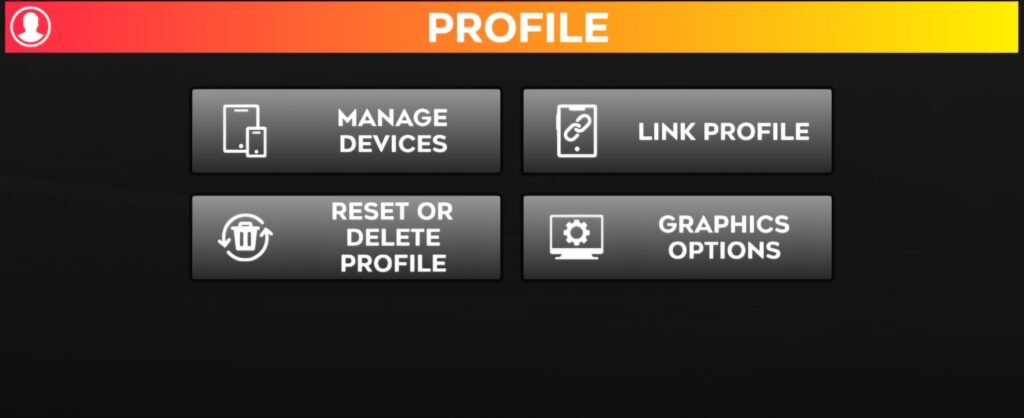
🔧 Step-by-Step Guide
On Your Old Device
- Open DLS 26 → Settings → Advanced Settings → Manage Device.
- Tap Generate Code.
- A one-time transfer code will appear — it’s valid for 5 minutes. ⚠️ Do not close the game or let the timer expire.
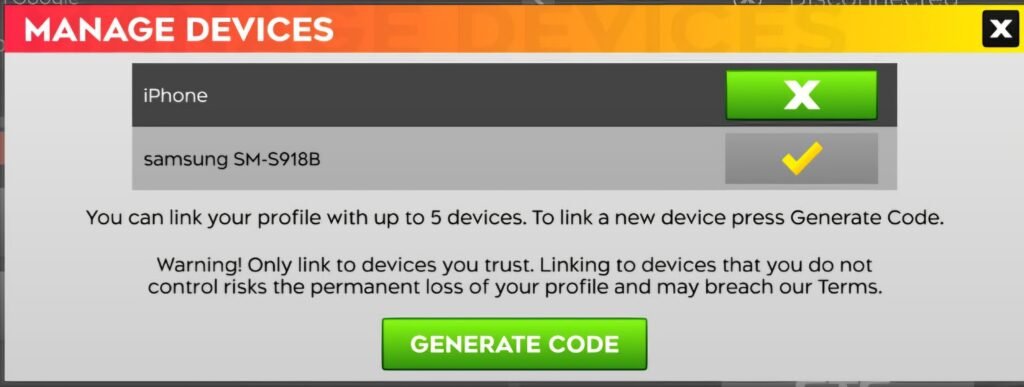
On Your New Device
- Install and open DLS 26.
- Go to Settings → Advanced Settings → Link Profile.
- Enter the code generated from your old device.
- Confirm to link your existing game data.
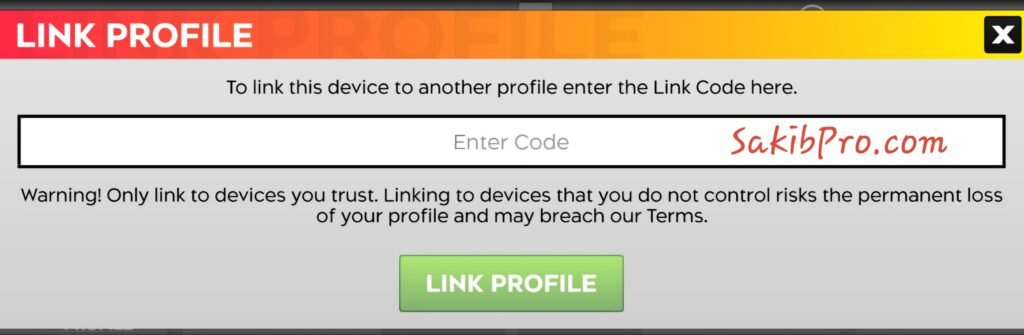
Your full profile — including team, division progress, and customizations — will now appear on the new device.
🕒 Important Notes
- The generated code expires after 5 minutes, so complete the process quickly.
- A single DLS 26 profile can be linked to a maximum of 3 devices.
- Once linked, all devices will share the same career progress.
- This method works both ways: Android → iOS and iOS → Android.
🚫 What Doesn’t Work Anymore
Old manual backup tricks — copying the com.firsttouchgames.dls7 folder or using file explorers — no longer work.
DLS 26 stores all game data securely online and validates every login through its servers. Always use the official transfer system.
Dream League Soccer 2025 finally makes it easy to move your progress between devices — even across platforms.
Just remember:
- For the same OS, use Cloud Save.
- For cross-platform, use the Manage Device → Generate Code / Link Profile system.
This method is 100 % in-game verified and keeps your data safe across up to three devices.
Me gusta mucho
Es un gran
Un gran grandísimo juego
are they going to get
Je veut double compte dls